
The jewellery industry has gone fully digital, and choosing the right jewelry CAD software could be the most important decision you make as a design student or aspiring jewellery professional. Whether you are just starting or ready to specialise, these 3 tools dominate the conversation: Rhino 3D, Matrix Gold, and ZBrush. Each serves a different purpose, suits a different learning stage, and opens different career doors.
This guide cuts through the noise with a clear comparison of all three, covering cost, capability, learning curve, and which type of jewellery work each tool is best suited for. If you are looking for the right CAD software for jewelry design to match your goals, you will find your answer here.
What Is CAD Software for Jewelry Design?
CAD software for jewelry design lets designers create precise, three-dimensional digital models of rings, pendants, bangles, earrings, and other pieces before a single gram of metal is used. These digital models go directly into 3D printing, lost-wax casting, and CNC machining workflows, the three primary production methods used in modern jewellery manufacturing.
The shift from hand-drawing to jewellery designing software has transformed the industry. Pieces that once took days to model in wax can now be built, refined, and revised in hours on screen. For students entering the jewellery trade today, proficiency in at least one CAD tool is expected, not optional.
1. Rhino 3D
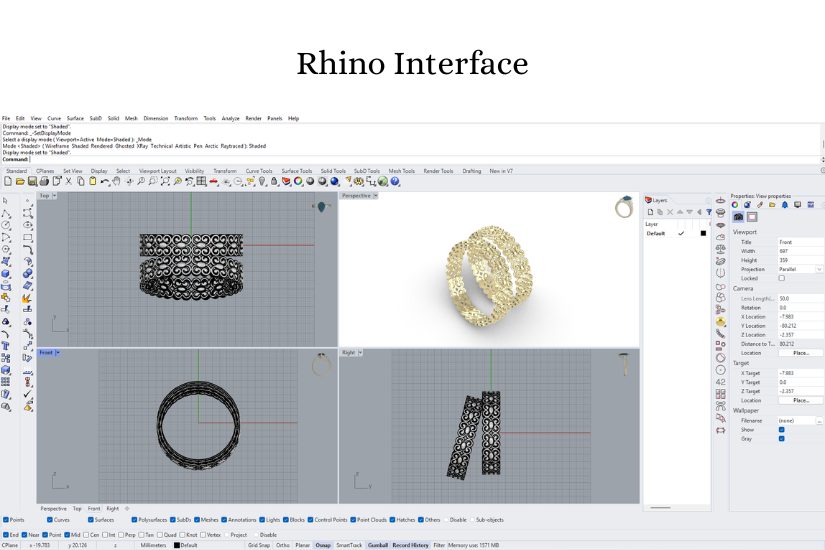
Rhino 3D (Rhinoceros 3D) by Robert McNeel & Associates is the backbone of professional jewellery CAD. It is not jewellery-specific by default, but it powers the entire ecosystem. Matrix Gold and RhinoGold, plugins are built on top of it.
Rhino uses NURBS (Non-Uniform Rational B-Splines), the mathematical geometry standard for smooth, precise curves. This makes it exceptional for ring shanks, prong tips, bezel edges, and any part of a jewellery piece where an off-by-a-fraction error would ruin a casting.
Key Features
- Includes mathematically precise curves and surfaces essential for jewellery
- Works on Windows and Mac
- Extensible with plugins like Matrix Gold, RhinoGold, Grasshopper (parametric design), V-Ray
- Direct output for 3D printing (STL, OBJ) and CNC machining (STEP, IGES)
- Grasshopper visual scripting for parametric, rule-based jewellery design
| Pros | Cons |
| Extreme dimensional precision, Critical for manufacturing | Not jewellery-specific (gem settings and ring sizing require plugins) |
| Versatile across jewellery, architecture, and product design | Rendering requires an additional plugin, such as V-Ray or KeyShot |
| Large global community with free tutorials and forums | Moderate learning curve for beginners with no 3D experience |
| Educational licence at reduced cost (For students) | Plugin costs add up if you add Matrix Gold on top |
Who Should Learn Rhino 3D?
Anyone serious about CAD software for jewelry design should learn Rhino 3D first. It is the foundational skill that makes everything else possible; if your eventual goal is Matrix Gold or another professional plugin, Rhino is the prerequisite. It also gives you flexibility to work across other design industries.
2. MatrixGold
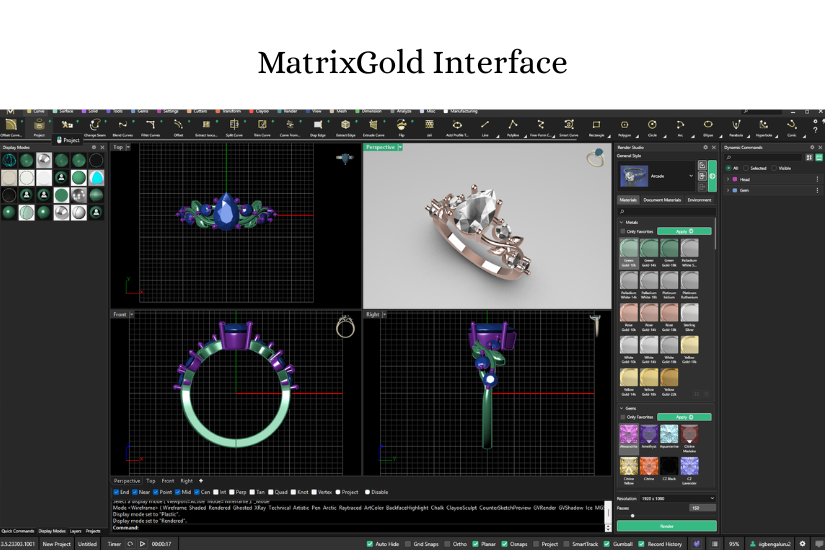
MatrixGold by Gemvision is the tool of choice in high-volume commercial jewellery manufacturing. It runs as a plugin in Rhino 3D, layering a comprehensive, jewellery-specific toolkit on top of Rhino’s precision engine. If you have ever seen a perfectly executed parametric pavé layout or a custom commission ring with an auto-adjusted shank, there is a good chance Matrix Gold was involved.
What sets Matrix Gold apart is its ability to change a ring size, centre stone dimension, or prong count mid-design, and have the entire model adjust automatically.
Key Features
- Full jewellery-specific toolkit: ring shanks, prong, bezel, and channel settings, pavé layouts
- Parametric history tree helps edit one parameter, and the whole design updates automatically.
- Automated gem libraries with accurate stone dimensions and weight calculations
- Batch sizing grids and technical manufacturing outputs
- KeyShot integration for photorealistic client-ready renders
| Pros | Cons |
| Purpose-built for jewellery | Windows only |
| Parametric history saves significant time on commissions and custom work | High cost |
| Highly accurate gem placement, material weight estimates, and stone counting | Overkill and expensive for students at the beginning of their learning journey |
| Official Gemvision certification strengthens your professional credibility | Steeper total learning curve, as you must learn both Rhino fundamentals and Matrix tools |
Who Should Learn Matrix Gold?
Matrix Gold is the right investment if you are targeting jewellery manufacturing roles, working in a high-end custom design studio, or planning to enter the retail and export segment. Build your Rhino foundations first, then move to Matrix Gold as your production tool.
3. ZBrush
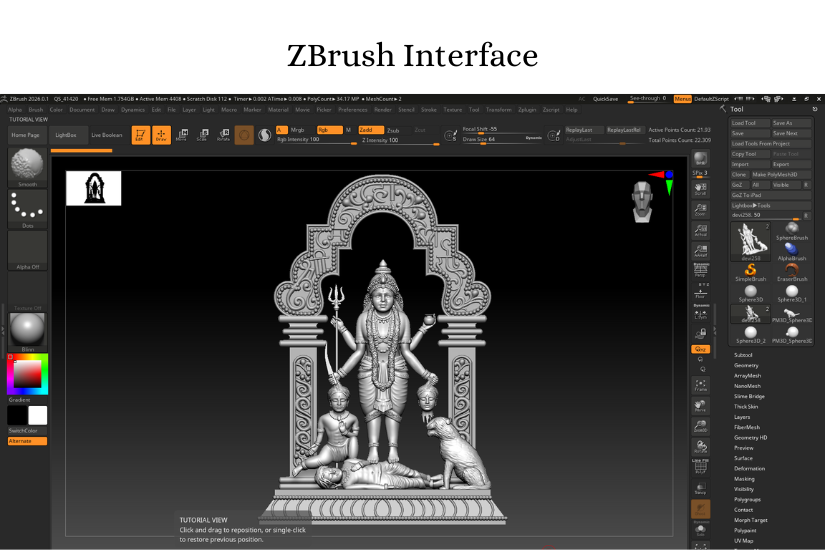
ZBrush (by Maxon) is the digital sculpting standard across the jewellery, film, and game industries. Unlike Rhino and Matrix, which work with precise mathematical geometry, ZBrush treats 3D space the way a sculptor treats wax or clay; you push, pull, carve, and texture the form with your hands. It can handle tens of millions of polygons simultaneously, making it capable of detail that no NURBS-based tool can match.
For traditional Indian jewellery like temple jewellery, bridal kadas, Jadau pieces, and heritage-style pendants featuring gods, goddesses, animals, and floral motifs, ZBrush is unrivalled. The fluid drapes, the feather-fine relief carving, the texture of granulation, these are ZBrush’s natural territory.
Key Features
- DynaMesh technology automatically keeps models watertight, which is essential for clean 3D printing.
- Thousands of sculpting brushes, including weave, knot, and jewellery-specific texture sets.
- BPR (Best Preview Render) for quick, high-quality visualisations without a separate render engine.
- Available on Windows and Mac
| Pros | Cons |
| Unmatched for organic forms like floral motifs, figure carving, and traditional Indian jewellery | No native jewellery tools (no gem setting, ring sizing, or weight calculation) |
| DynaMesh keeps models watertight for flawless 3D printing and casting | Famously steep and unconventional interface |
| Ideal for temple jewellery, statement pieces, and sculptural collections | ZBrush models typically need to be re-based in Rhino or Matrix for precise manufacturing |
| BPR renders give quick, impressive client visuals without a separate render tool | Not a standalone production tool for commercial jewellery, best used alongside Rhino or Matrix |
Who Should Learn ZBrush?
ZBrush is for jewellery designers who specialise in artistic, high-detail, or traditional Indian jewellery like temple sets, bridal pieces, and sculptural contemporary work. It is not a replacement for Rhino or Matrix, but a powerful complement to them. The ideal workflow is to build precise dimensions in Rhino or Matrix, then bring the model into ZBrush for surface detailing and organic refinement.
The Professional Hybrid Workflow: Why Top Designers Use More Than One Tool
The most successful jewellery designers today do not rely on a single software. The industry’s preferred approach for high-end and traditional pieces combines the precision of NURBS-based tools with the organic capability of sculpting software, as follows:
- Build the precise ring base, stone seats, and dimensions in Rhino 3D or Matrix Gold
- Export the model to ZBrush for surface texturing, organic carving, and fine detail work
- Re-import to Rhino or Matrix for final production checks, stone placement, and manufacturing output
- Bring into Blender for high-quality lifestyle renders for the client or social media (Optional)
This hybrid approach is especially common in studios producing temple jewellery, bridal collections, and bespoke sculptural pieces, where neither precision nor artistic detail can be sacrificed.
Which Jewelry CAD Software Should You Learn? A Decision Guide
The best tool depends on where you are right now, what you want to design, and the type of career you are aiming for. Match your situation to a recommendation below:
| Your Situation | Best Jewelry CAD Software Pick |
| Jewellery student on a tight budget | Start with Blender (free), JewelCraft addon. Build 3D foundations before investing in paid tools. |
| Want industry-standard skills for a studio | Learn Rhino 3D first; it is the universal base for all professional jewellery CAD workflows. |
| Targeting manufacturing or export roles | Invest in Matrix Gold; it is the production standard in high-volume jewellery studios. |
| A traditional designer moving into CAD. | Rhino 3D & Matrix Gold or Blender. Both are approachable with structured training. |
| Designing sculptural or temple jewellery | ZBrush for organic detail work, combined with Rhino 3D or Matrix Gold for dimensions and settings. |
| Freelancing or running your own label | Rhino 3D for precision, ZBrush for detailing, Blender for lifestyle renders. |
| A student whose institute teaches one tool | Master that tool fully (Rhino, Matrix, or Blender) |
For most jewellery students, the strongest long-term path is: Rhino 3D as your foundational skill, Matrix Gold or ZBrush as your specialisation and moving forward with Blender as your rendering and visual presentation layer. You do not have to learn all four at once; start with what your institute teaches or what your budget allows, and build from there.
What Indian Jewellery Studios and Employers Expect
In India’s major jewellery hubs like Bangalore, Surat, Mumbai, Jaipur, and Kolkata, Rhino 3D is the near-universal baseline. Job postings for CAD jewellery designers most commonly specify Rhino, Matrix Gold, or both. Studios engaged in temple jewellery, bridal, or bespoke artistic work increasingly expect ZBrush proficiency alongside their NURBS toolkit.
Blender is gaining recognition as a rendering and visual asset tool, particularly in brands that produce digital catalogues, social media content, and virtual try-on experiences. It is rarely listed as a primary manufacturing requirement but is increasingly valued as a supplementary skill.
For students in Bangalore specifically, exposure to jewellery designing software through a structured course like our full BSc in Jewellery Design(Gems & Jewellery) rather than self-teaching alone, is the most reliable way to meet the technical expectations of local studios and export houses from day one.
Choose the right Jewelry CAD Software for Where You Are Going.
The best jewelry CAD software is not the most expensive or the most talked-about; it is the one that matches your current learning stage and your career direction. Rhino 3D is the universal foundation. Matrix Gold is the manufacturing standard. ZBrush is the artistic powerhouse for sculptural and traditional jewellery. Blender is the cost-free entry point that also doubles as a world-class render engine.
The designers who stand out in the jewellery industry are those who understand how these tools complement one another and who build their workflow deliberately rather than defaulting to just one. Whatever tool you begin with, structured training, consistent practice, and a portfolio of real designs will carry you further than the software choice alone.
Frequently Asked Questions:
For beginners, Rhino 3D is the best starting point if there is a budget, and Blender with the JewelCraft add-on is the best free alternative.
Yes. Most jewellery CAD courses are designed for students with no prior 3D experience. Rhino 3D and Blender both have structured beginner learning paths. Enrolling in a formal jewellery design programme is the fastest route, as you receive guided instruction alongside practical briefs rather than navigating free tutorials alone.
Not for manufacturing purposes. ZBrush is a sculpting tool without native gem setting, ring sizing, or precise dimension controls. It is most effective when combined with Rhino 3D or Matrix Gold.
Rhino 3D is the most widely used base platform across Indian jewellery studios. Matrix Gold is the preferred specialist tool in large manufacturing and export environments. ZBrush is used in studios focused on traditional, bridal, and sculptural jewellery.
Rhino 3D is a general-purpose precision 3D modelling platform. Matrix Gold is a jewellery-specific plugin that installs inside Rhino and adds automated tools for gem setting, ring sizing, and production workflows. You need Rhino to run Matrix Gold; they are used together, not as alternatives.
| Start Your Jewelry CAD Design Journey at IIG South. IIG South offers jewellery design courses in Bangalore with hands-on training in industry-standard jewelry CAD software. Learn from working professionals, build a real portfolio, and graduate with the skills studios and manufacturers are hiring for. |